Central document management
One system for all maintenance documents
INEXTIA document management brings all maintenance-related documents together in one system. Documents can be linked to components, jobs, job history, items, procedures and many other places so that employees always see the right documentation in the right context.
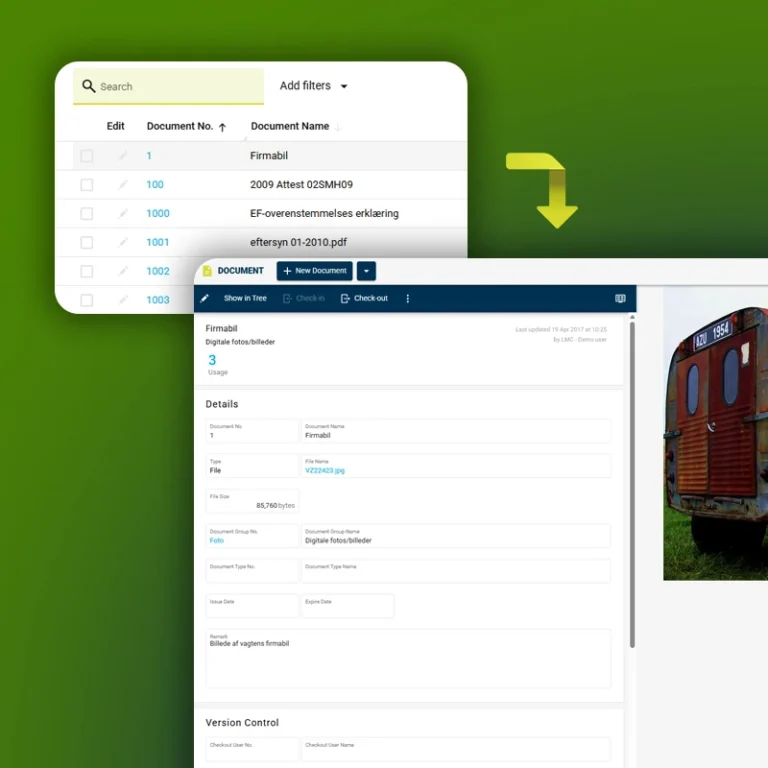
When a document is updated, the change is automatically reflected everywhere it is linked to. The system also builds a version history with date, user and changes, so you can always see who did what when.
The documents are accessible from desktop, mobile layout and the INEXTIA app, so employees always have the latest manuals and drawings with them.
Key Features
What you get with INEXTIA Document Management
INEXTIA Document Management brings all maintenance documents together in one place and makes them easy to find, update and use. This ensures that employees always work with correct and up-to-date information, reducing the risk of errors and minimizing audit findings.
Attach documents
Documents can be attached to all relevant objects in INEXTIA, such as components, jobs, job history, procedures, goods or purchase orders, so the information is always where you need it.
Support for all file types
INEXTIA supports all common file types, including PDF, Word, Excel, images, drawings, videos, links and more, so all documentation is collected in the system.
Mobile access
Access documents directly on site via the mobile layout or the INEXTIA app, so you can continue working without having to return to the office.
Central document library
One place for all documents with search and automatic duplicate checking.
Drag & drop upload
Add documents quickly by dragging files directly into the system.
Version control
Secure check out/check in, automatic version history and full change log for all files.
Advanced document management
Structure your document management in your maintenance system
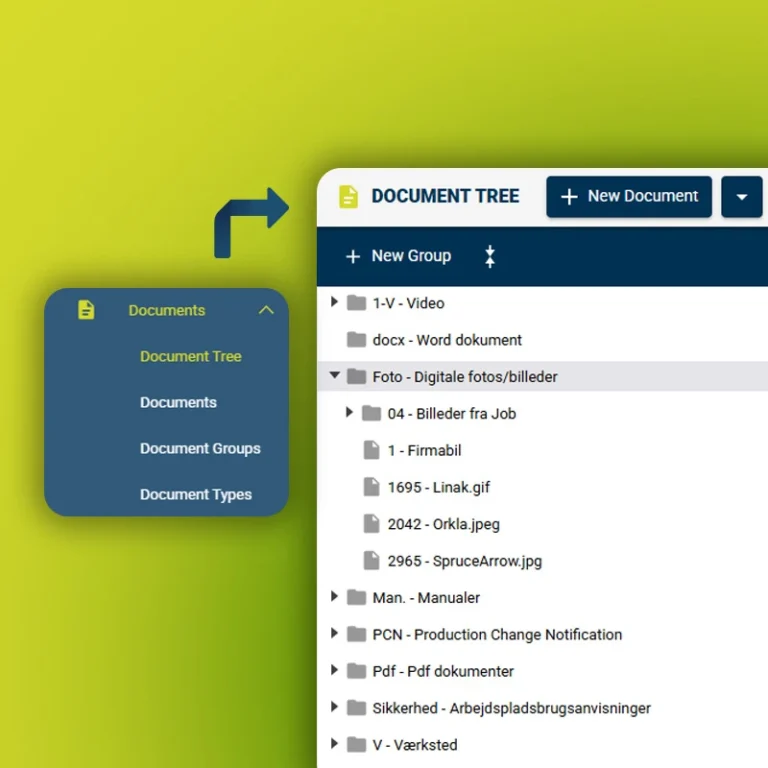
Advanced Document Management extends the module with an optional flexible document structure. Here, documents can be organized in a hierarchical structure – similar to a classic file server – but with the benefits of being integrated into your maintenance system.
Documents are grouped into document groups, for example by areas, plants or projects, and the structure can be built in multiple levels. You can also define document types such as images, drawings, manuals, PI diagrams, service reports, etc. which are automatically grouped into subfolders.
It provides you with a maintenance-focused document structure that acts as a centralized document and file management tool and can replace a traditional file server.
Extra Key Features
Get more with INEXTIA Advanced Document Management
Upgrade your Document Management and get an additional hierarchical folder structure across plants and locations. This makes it easier to organize, find and manage maintenance documents without losing the link to components, jobs and history in INEXTIA.
Flexible folder structure
Build a logical, multi-level document structure that reflects your facilities, areas or projects.
Automatic display of document types
Document types such as images, drawings, manuals and reports are automatically displayed as subgroups.
Replacing classic file server
With a web-based and maintenance-oriented structure, documents are always accessible, even when you're on the go.
Benefits
Why teams choose Document Management
- Effectiveness
Less wasted time in everyday life
With all documents in one library, you no longer have to search for files on local drives, in binders and on old file servers. Documents are located directly on the component or job where they are needed.
- Quality & safety
Always the latest version
Documents are updated in only one place and automatically propagate to all locations where they are linked. This ensures that everyone works with the same version and eliminates the risk of errors, outdated manuals and duplication.
- Traceability
Audit-ready in seconds
Version history and change log provide complete traceability so you can easily document who updated what and when to authorities, classification societies or internal quality requirements.
Frequently Asked Questions
INEXTIA Document Management
What are the benefits of document management system vs regular file server?
A file server can store files, but it does not support operations and maintenance. With INEXTIA Document Management, documents are stored directly on components, jobs, job history and procedures in your maintenance management system (CMMS). Technicians and planners see the relevant manuals, PI and electrical diagrams and work instructions where they plan or perform the tasks – not in a separate folder system.
For manufacturing companies, process industries, food production, pharma, energy and utilities, this means less downtime, fewer errors and more stable machine uptime. At the same time, you get version control, traceability and documentation that supports ISO 9001, ISO 14001, ISO 45001 and GMP (Good Manufacturing Practice) requirements.
Do we need to change our existing file structure to use Document Management?
No, you don’t have to change the existing file structure right away. You can start small and build up.
Many companies start by entering the most important documents, manuals, technical drawings, spare parts catalogs, service agreements and quality specifications into INEXTIA and link them to the most critical systems and components via Master Data.
You can then move more folders and files over as they become relevant for preventive maintenance, inspections and service intervals. For a period of time, Document Management can run in parallel with your file server for a smooth transition without disruption.
Can technicians access documents at the equipment?
Technicians can access documents directly at the equipment via the INEXTIA App. They find tasks in the Job List, open the job and instantly see the associated manuals, diagrams, photos and checklists from Form. It takes just a few clicks, and searching by plant, component or job makes it quick to find the right documentation.
The technician can take pictures “on site” and save them on the component or job history in the Logbook as part of the documentation. In case of poor network coverage, data can be stored locally on the device and synchronized when connectivity is restored. The result is less administration for the technician and shorter troubleshooting time when crashes occur.
How does document management software ensure we are using the latest version?
INEXTIA Document Management has built-in version control with check out/check in. Only one person at a time edits the document, and when the file is updated, the change is reflected everywhere the document is linked: for example, on components, jobs in Job List, plans in Job Scheduler and history in Logbook.
The system saves a change log with date, user and comment so you can always see who changed what and when. This reduces the risk of someone being left with old instructions or outdated drawings and makes it easier to pass audits and regulatory inspections.
Which documents and file types are supported in Document Management?
Document management supports all common file types, so you can gather all maintenance documentation in one place in your CMMS:
- PDF, Word and Excel files
- 2D/3D drawings, PI and electrical diagrams
- Service reports, checklists, certificates
- Images and short instructional videos
You can also store links to supplier portals, online manuals and other systems and associate them with plants, components and locations in Master Data. Combined with Analytics and Dashboard, you can then track how better documentation affects breakdowns, uptime and OEE (Overall Equipment Effectiveness).
What does Advanced Document Management add to your software?
Document Management implementation can be customized to your resources and maturity. Typically it involves:
-
Clarify which plants and lines are most critical.
-
Import component structure and plants via master data.
-
Load and attach key documents to components and jobs.
-
Short training for technicians and planners on how to use the INEXTIA App and Document Management.
Learn more about our startup and ongoing support services.