Introduction
When a critical machine breaks down, the impact is felt immediately. Production is delayed, the maintenance schedule falls behind, and employees must put their planned tasks on hold to get the equipment back up and running safely.
To prevent system failures, you need to know why and how often errors occur, as well as how much downtime costs. When you view errors, repair times, and downtime in the context of historical data and costs, you can prioritize your efforts where the losses are greatest.
Learn more about INEXTIA's maintenance system
The Basics
What are MTBF, MTTR, and availability?
MTBF, MTTR, and availability are three key KPIs for assessing operational reliability. You’ll get the most value by looking at them together and tracking their trends over time, so you can plan your maintenance more effectively.
Mean Time Between Failures (MTBF)
MTBF stands for Mean Time Between Failures and indicates how long, on average, your equipment will operate between two failures. A higher MTBF generally means that the equipment operates for longer periods between failures. However, since MTBF is an average, you cannot use this figure to predict exactly when the next failure will occur.
MTBF = Total operating time ÷ Number of failures
A pump operates for 600 hours and experiences three failures:
MTBF =
600 hours
3 failures
= 200 operating hours
Mean Time to Repair (MTTR)
MTTR indicates the average time it takes to get equipment back up and running after a failure. You can choose to include troubleshooting, the repair itself, testing, and restarting. A low MTTR typically means shorter downtime, but the result also depends on whether you have the right spare parts, instructions, and expertise available when the failure occurs.
MTTR = Total repair time ÷ Number of repairs
A pump needs three repairs, which combined take 12 hours:
MTTR =
12 hours
3 repairs
= 4 hours
Availability
Availability indicates what percentage of the planned operating time your equipment is ready for use. This is often the KPI that management pays attention to, because you can use it to link maintenance directly to production, delivery capability, and capacity utilization.
Availability = MTBF ÷ (MTBF + MTTR) × 100
This example uses the calculations from the two previous MTBF and MTTR examples with the pump:
Availability =
200 hours
200 hours + 4 hours
× 100
= 98% availability
How MTBF, MTTR, and availability are related
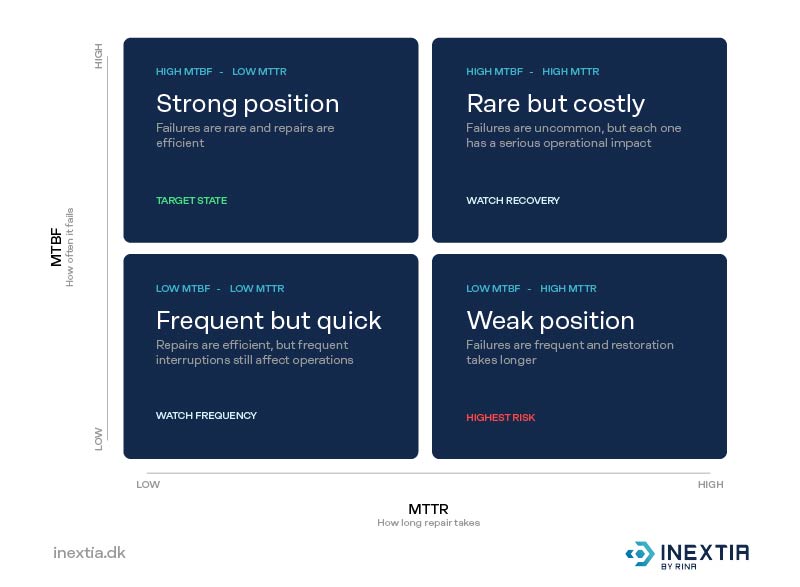
How do you minimize downtime?
Availability shows the result, while MTBF and MTTR indicate whether downtime is caused by frequent failures, lengthy repairs, or both. A maintenance system like INEXTIA can collect the necessary data and make it easier to prioritize the measures that reduce downtime the most.
See how BWSC ensures more efficient day-to-day operations with INEXTIA:
MTBF in practice
How to use MTBF in your daily maintenance routine
By tracking MTBF over time, you can see which machines most frequently disrupt operations and whether the same failures keep recurring. This gives you a better basis for prioritizing where the team should focus its efforts first.
Shared data gives the team an overview and makes it easier to prioritize, prevent sudden operational shutdowns, and bring structure to day-to-day operations.
Bring structure to your maintenance with a systematic approach
MTTR in practice
Use MTTR to get equipment back up and running faster
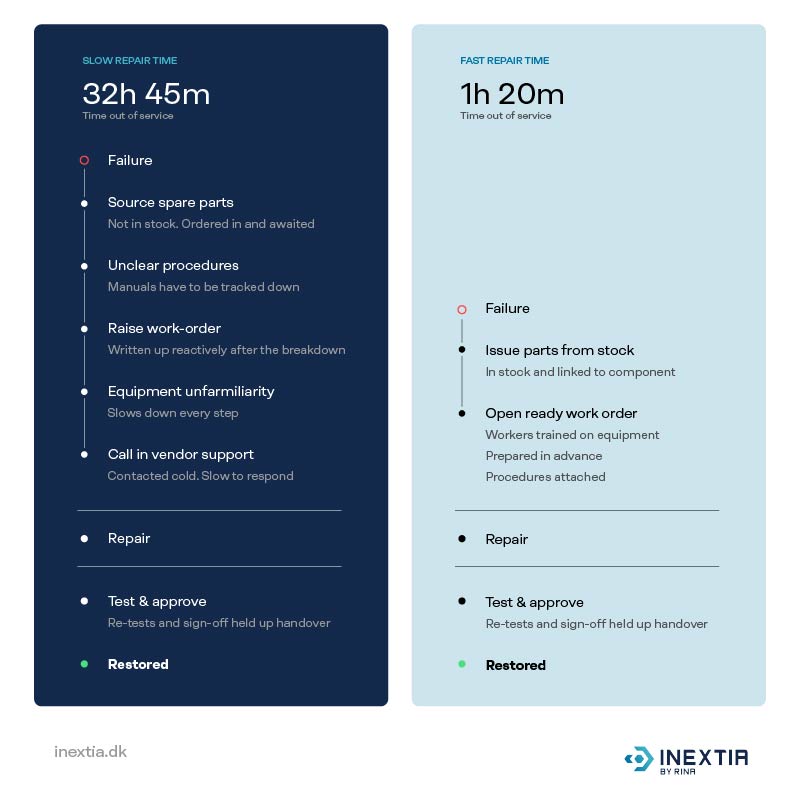
MTBF helps you reduce the number of failures. MTTR is about how quickly you can get back up and running when a failure does occur. This applies to the entire process, from the failure notification to the restart.
By improving job preparation, documentation, spare parts management, and troubleshooting, you can reduce MTTR and increase availability.
In INEXTIA, you create a one-time job on the machine as soon as it goes down. You enter a description of the error and set a due date based on how critical the error is, so the team knows what to resolve first. Each error is saved on the machine. The next time, the technician can see what happened last time, and you can use the history to plan the maintenance that will prevent the next error.
Learn how to handle system crashes with one-time jobs:
Availability in practice
What does availability tell us?
Availability indicates whether maintenance keeps the machines running when production needs them.
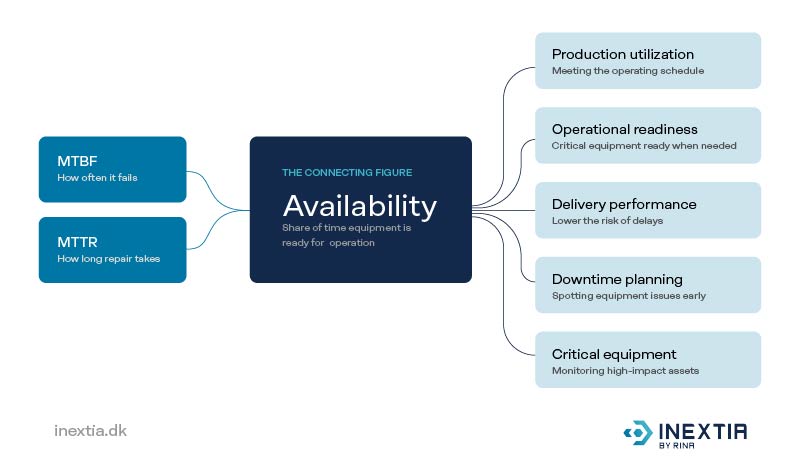
Combine maintenance tasks, documentation, and history into a single system like INEXTIA so that scheduled downtime can be planned well in advance.
Data quality
Common challenges when assessing the need for maintenance
In INEXTIA, you can create your own forms and checklists with fixed fields and make them mandatory for the job. The technician fills them out in the app right at the machine, so everyone records the same information in the same way.
Actions
From maintenance data to concrete improvements
MTBF, MTTR, and availability are only meaningful if you take action on them.
In INEXTIA, data from your maintenance tasks, failure reports, and history are all gathered in the Analytics module, so you can analyze them and keep track of how they’re evolving. In the Dashboard, your data is visualized so you can quickly get an overview of whether anything is changing.
Not sure where to start? Check out these seven examples of reports you can use to improve operations and maintenance.